Configure Settings
Beginning with Tesla One version 26.9.1, all critical settings are consolidated on a single Settings screen.
Choose a Grid Code
- Select Settings,
then expand the Grid Code menu. Choose the Country,
Region, Energy Utility, and the grid
code standard, and ensure that the Voltage/Frequency
selected for the site is correct. NoteIf a dropdown menu does not have the desired option, select All Other or select the option that most closely resembles the desired region.
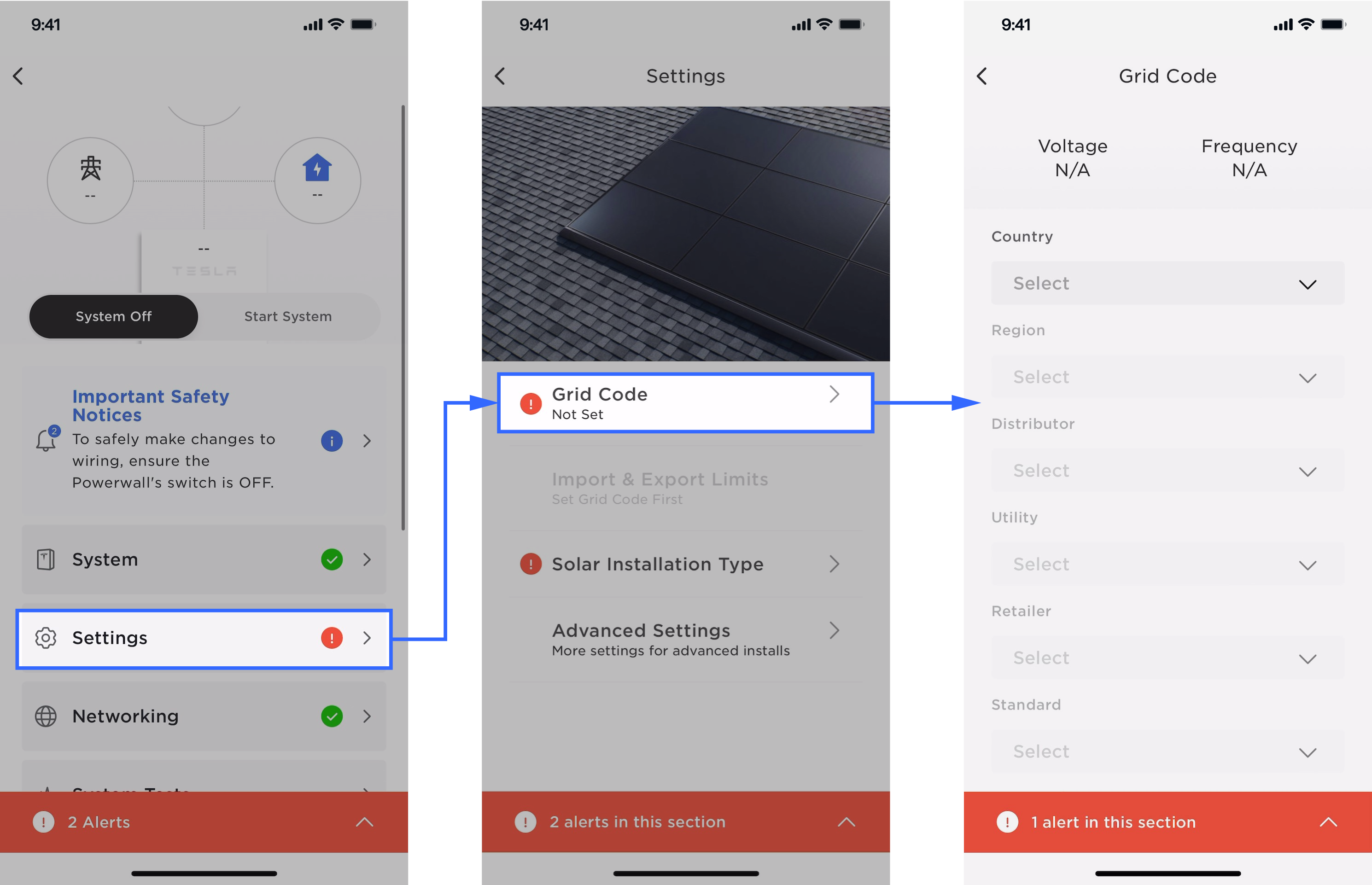
- Select Done.NoteYou cannot change the grid code while the system is running.
Select the Solar Installation Type
- Expand Solar Installation
Type menu. Choose from one of the below options.
- Select Solar Panel when the customer's house has solar panels installed on top of the existing roof.
- Select Solar Roof when the roof of customer's house is made of solar tiles.
- Select No Solar if solar is not installed.
- Select Done.NoteThis field is required so that Powerwall+ / Tesla Solar Inverter functions properly, and so the Tesla app uses the correct graphics.